HTML Studio
See how a web page is made: build it from real tags, with the code always on screen.
Start something new
Start blank or from a starter site.
Learn it
About HTML Studio, and what schools get
A free online HTML and CSS editor for schools
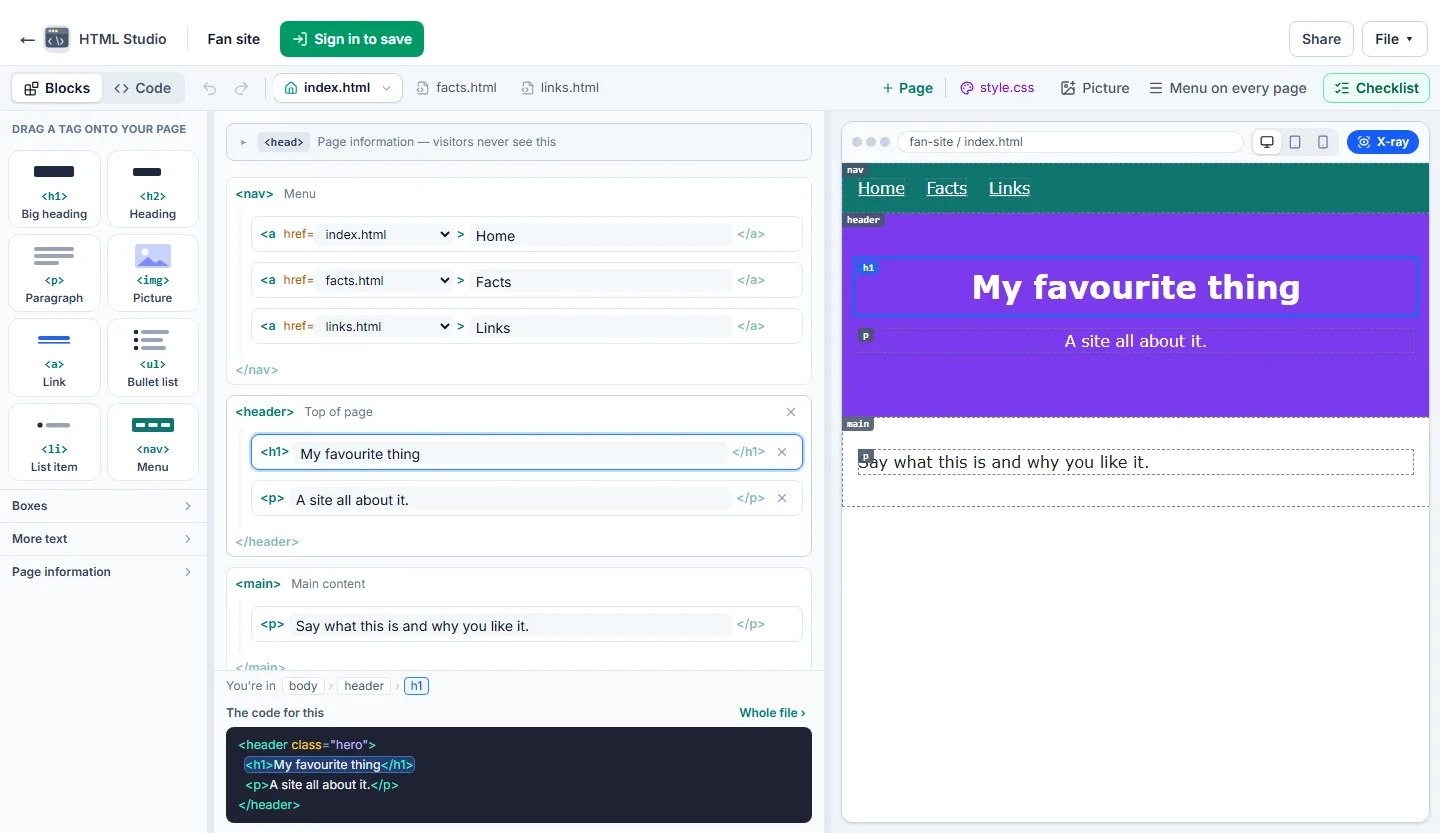
HTML Studio is where pupils learn how a web page is really made. They build pages from real HTML tags and a real style.css, with the code on screen the whole time and the page updating beside it. It runs in the browser on school desktops and Chromebooks, and nobody needs an account to use it.
How it teaches HTML
- Blocks first, then code. Pupils start by adding tags as picture tiles, and switch to typing the code when they are ready. Both views edit the same page.
- X-ray the page. Turn on X-ray and the preview outlines every tag. Click anything on the page to jump straight to the code that made it.
- Real multi-page websites. An index.html home page, more pages, one shared style.css and links between them, the way a site on the web is built.
- CSS that explains itself. Pick any part of the page to see every style rule that reaches it, and which one wins.
- Broken sites to fix. Three starters come with mistakes planted in them: missing tags, links that go nowhere and styles that clash. Pupils track them down.
Guided HTML tutorials
Five short builds take a pupil from a first page to a styled, multi-page site. Each step checks their page before it moves on, so they cannot skip ahead with something broken.
- Your first page (15 min)
- Pictures and links (15 min)
- Building a website (25 min)
- Making it yours with CSS (20 min)
- Layout and audience (25 min)
Common questions
- Is it free, and do pupils need an account?
- It is free, and pupils can build and download a whole website without an account. Saving a site to come back to, publishing it to a link and uploading their own pictures need a sign-in.
- Does it work on school computers and Chromebooks?
- Yes. It runs in the browser, so there is nothing to install and nothing for your network team to unblock beyond the site itself.
- Is it real HTML, or a drag-and-drop page builder?
- Real HTML and CSS. Every block is a tag, and switching to Code shows the exact HTML and style.css the pupil has built. A downloaded site opens in any browser.
- We used Mozilla Thimble or Glitch. Is this similar?
- It covers the same lesson: write HTML and CSS in a browser and see the page change as you go. Thimble closed in 2019 and Glitch stopped hosting projects in 2025. HTML Studio adds a blocks view for pupils who are new to tags, guided tutorials that check each step, and broken sites to debug.
- Can I set it as work and see what pupils make?
- With a school account, yes. Send it to every pupil's screen, set an HTML task inside an assignment with its own Check my work button, and open any pupil's site, running, when you mark it.
- Which pupils is it for?
- Anyone meeting HTML for the first time, which in most schools means a KS3 web design unit. Older pupils use the Code view to try HTML and CSS quickly without setting anything up.
What a school account adds
HTML Studio stays free and is one of about twenty tools. A school account adds saved work that follows a pupil between devices, HTML tasks you can set and mark, KS3 Computing and GCSE courses, and a dashboard showing where a class is losing marks.
Also free: the Logic Gate Studio, online Python editor and every other free tool.